JumpLaunch Adds Quick Launch Links to Windows 7 Taskbar

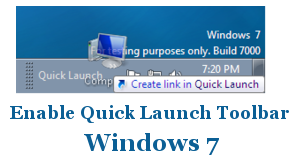
Enable Disable Quick Launch Toolbar
Quick Launch Bar feature was first introduced in Windows XP to allow users to create list of favorite programs to open with a single click, without having to go through the Start menu. Unfortunately Microsoft has removed Quick Launch Bar from Windows 7.

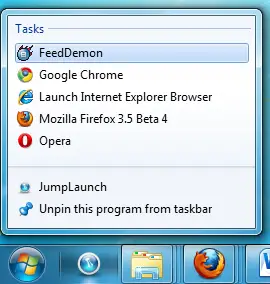
We have written guide how you can get back Quick Launch Bar in Windows 7 which is just emulates like Quick launch bar. Now here is simple app Jumplaunch which can display quick launch shortcuts in a jump list.

Jumplaunch Windows 7 Quick Launch

Start JumpLaunch
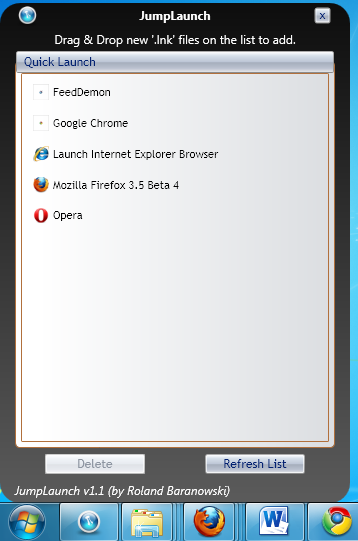
JumpLaunch

Add/Delete Shortcuts which you want in your Quick Launch list
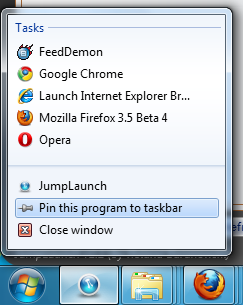
Pin JumpLaunch to Taskbar

Then Pin JumpLaunch to taskbar

Windows 7 Quick Launch

Now just right click to access your Quick Launch programs
Download Jumplaunch.

How to Create Portable Office 2010 Starter USB Flash Drive

Portable Office 2010 Starter

Few days back we had reported about Office Starter 2010 leak as well as posted screenshots and comparison with Office 2010 Professional. In that article we had mentioned about Microsoft Office To-Go Device Manager office tool.

Now today we are here with complete step by step guide on how to use Office To-Go Device Manager to create Portable Office 2010 starter edition. Using this guide you can now crate portable Office 2010 USB Flash drive and carry anywhere you want and start using it.

How to Create Portable Office 2010 Starter USB Flash Drive

1. You must have installed Office Starter 2010 edition

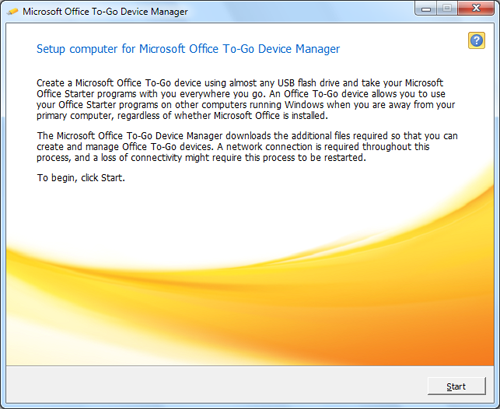
2. Start Microsoft Office To-Go Device Manager from start menu

Microsoft Office To-Go Device Manager

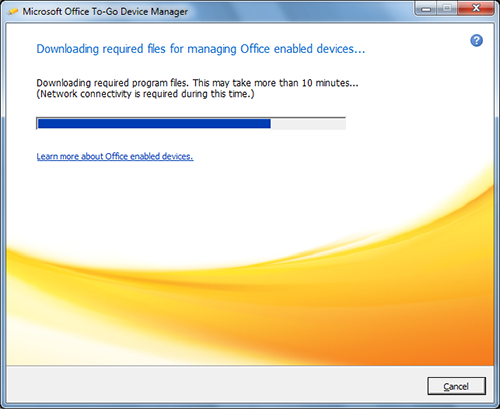
3. Click on Start button and let Office To-Go Device Manager to download required files

Microsoft Office To-Go Device Manager Downloading

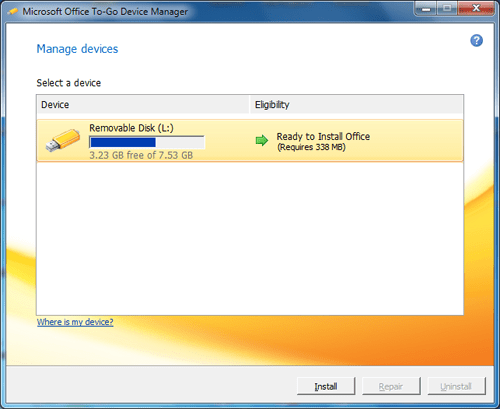
4. When you get screen asking for Select a device, insert your USB flash drive and select respective flash drive from the selection screen & click on install.

Select a Device

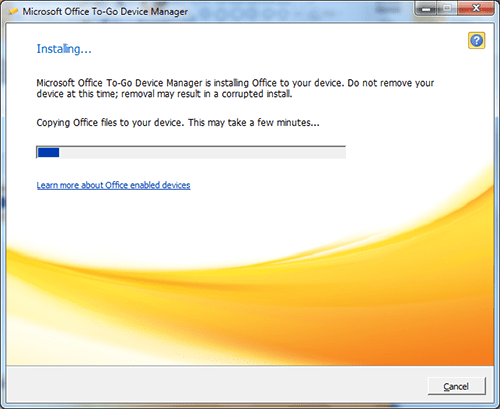
5. Now Office To-Go Device Manager will start installing Office Starter 2010 on selected USB drive.

Installing Portable Office 2010

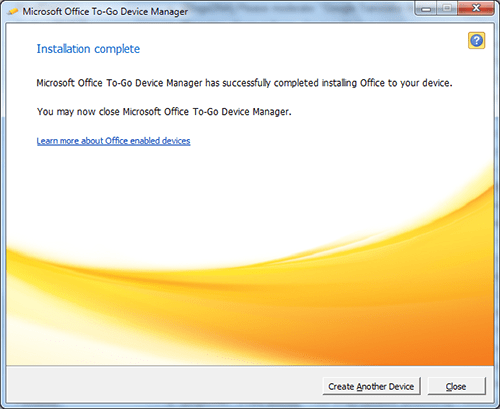
6. A message will be displayed when Device To-Go completed installation. click on Close button.

Installation Complete

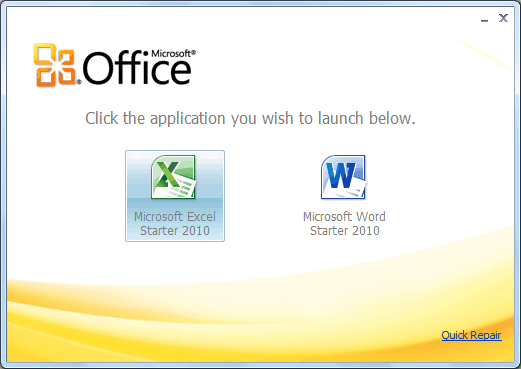
7. Now Start Office.exe from USB flash drive to start portable Office starter 2010,

Start Portable Office 2010 Starter

That’s it.

If you want to repair of uninstall portable Office starter 2010 from USB flash drive then follow steps 1-4. In step four inset USB drive on which you want to repair or uninstall Office Starter 2010.

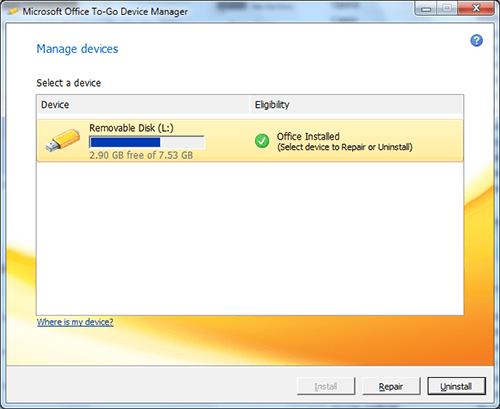
On selecting USB flash drive, Microsoft Office To-Go Device Manager will automatically detect installed Office Starter 2010 and let you to Repair or Uninstall.

Uninstall or Repair Portable Office 2010

Repair & Fix Windows 7 & Vista Problems with FixWin Utility

FixWin Logo

In past WindowsClub has releases couple of utilities like FixWU, FixIE, FixMSE & Prevent. Now here is yet another freeware utility FixWin from Windows Club. FixWin is utility to repair & fix Windows 7 & Vista problems & annoyances. FixWin v 1.0 is a 529 KB freeware portable application to repair & fix common Windows annoyances & issues.

The solutions to repair and fix 50 common Windows annoyances, issues & problems have been categorized under 5 tabs, viz : Windows Explorer, Internet & Connectivity, Windows Media, System Tools & Misc Additional Fixes.

FixWin

FixWin

Download FixWin.

Sync HTC Phone with Outlook or Install Android Apps on HTC with HTC Sync

HTC PhoneHTC Sync lets you synchronize Outlook and Windows Address Book (Outlook Express), contacts and calendar events on your PC with your phone. It also lets you install third-party Android applications on the phone, and the Mobile Network sharing function as well.

HTC Sync also syncs your HTC Phone’s time with your PC’s time and vice versa, providing the most accurate time for you, wherever, or whenever, you are. Sync your phone with ease. Just plug in your HTC phone to your PC using a Mini (Or Micro) USB cable and watch as HTC Sync displays your model name and starts to sync your information for you.

HTC Sync

HTC Sync

Download HTC Sync.

DVD PixPlay PRO 5.04.1112


QUOTE

Create DVD, VCD, or PC slideshows from your photos, videos, and music - and burn them directly to a disc. Your family and friends can play your slideshow discs on their TV with a DVD player, or on their computer. With DVD PixPlay, you'll create personalized discs that are as easy to use as an ordinary DVD.

With more than 40 image motion effects and 160 transition effects, you can send your friends and family thoughtful keepsakes that they will cherish forever.

Features
? View your favorite digital photos and videos on your TV
? Or on your computer as an auto-playing slideshow
? Add audio files as background music or your own voice for a commentary
? Add shapes and clip art to your photos (such as Santa hats and speech bubbles)
? Add excitement to your slideshow with more than 40 image motion and 160 transition effects
? Use any image files (JPEG, GIF, BMP, PNG...), raw camera images (CRW, NEF...), common sounds (MP3, WMA, WAV...) or video files (AVI, MPEG...)
? Burn directly to a CD, DVD or Blu-ray disk (for playback in most DVD players, VCD players and computers)
? Easily create a DVD menu and burn multiple slideshows to a single disk
? Easily create title and other text pages
? You can also output video files (AVI, MPEG, etc) to VCD or DVD
? Convert a PowerPoint presentation for playback on a DVD player
? Retrieve images directly from a digital camera or scanner
? Preview your slideshow on your computer before you burn
? Add captions to your photos or automatically use your descriptions from Smart Pix, MegaView, Picasa, PhotoShop, etc.
? Powerful photo editing, including cropping, red-eye removal and automatic rotation of camera photos
? Output formats: DVD, VCD, SVCD, XVCD, XSVCD, MPEG, MP4, WMV and AVI (DivX, Xvid, YouTube compatible), with NTSC, PAL and Widescreen support

Hotfile Links :-
CODE
http://hotfile.com/dl/17524588/1ae1dcd/dvdPxPlyPro5.04.1112.rar.html

Sothink SWF Quicker 4.7

SWF Quicker is the leading Flash SWF Editor. It is the best flash animation editor to edit an existing SWF file or create a professional Flash animation from scratch. It is a powerful yet low cost Flash Animation Software. With SWF Quicker, both professionals and novices can create interactive contents for websites. As Flash has developed into the standard for animation on the web, Sothink SWF Quicker, a versatile Flash Maker, has emerged as an advanced and low cost option for Flash design. All elements of a Flash including text, shape, URL, ActionScript, etc. can be edited into your own style. You can capture Flash movie when viewing a page containing Flash, and import them to SWF Quicker. SWF Catcher, a FREE tool that can capture Flash, will be added to Internet Explorer's toolbar as a button after you install Sothink SWF Quicker.

Features:

» Fully support creating and editing Flash 8 files
» Support applying Flash filters to add special animating visual effects to objects
» Support exporting the movie as Animated GIF file and Windows AVI video
» Provide Object Snapping, Pixel Snapping and Snap Alignment to align objects
» Support creating Shape morph effect
» Support creating photo morph effect
» Provide various built-in Flash Album, Banner, Navigation Button and Slide Show templates
» Provide a group of tools for you to create vector graphics and texts in the way of WYSIWYG
» Support importing various kinds of media types, such as AI, MP3, MPEG, AVI, MOV, etc
» Fully support syntax of Flash ActionScript 2.0 to control the animations
» Provide an intelligent ActionScript Editor, which supports Syntax Highlighting, Auto Completion and Dynamic Prompt
» Support specifying keyframes to generate Tween Animations automatically
» Provide a large number of built-in animated effects
» Support importing and editing SWF files and the EXE files compressed from SWF files

What's New in SWF Quicker?

* Fully support creating and editing Flash 8 files.
* Added filters for you to add special animating visual effects to texts, buttons, and movie clips.
* Added Object Snapping, Pixel Snapping and Snap Alignment for you to align objects.
* Support exporting the movie as Animated GIF file and Windows AVI video.

Size : 15.7 MB

Download links :

Sharingmatrix

Or

Hotfile

Audio Editor Gold 8.7.1.1361

Audio Editor Gold is an advanced and powerful, full-featured digital audio editing software. You can use it to record your own music, voice, or other audio, edit it, mix it with other audio or musical parts, add effects like Reverb, Chorus, and Echo, and master it so that you can burn it to a CD, post it on the World Wide Web, or e-mail it. It provides an intuitive, easy-to-use interface and enables you to perform a lot of operations without any difficulties! Audio Editor Gold supports all major audio file formats. If you're using audio for anything - Websites, PowerPoint presentations, Flash animations, It will take your creations to the next level!

Use Audio Editor Gold to record your own music, voice or other sounds, import and export lots of audio files formats, including Windows PCM (WAV), MP3, Ogg Vorbis, WMA 9 and AIFF, play it, mix it, edit audio files visually using Cut, Copy, Paste and applying more than 20 effects and filters, including: Cut, Paste, Move, Delete, Fadein/Out, Crossfade, Vibrato, Delay, Normalize, Fade, Flanger, Amplify, Invert, Insert Silence, and more.

Features:

- Open, create, and save audio files in any of the supported formats (can also save any portion of a loaded file to disk as a new file);
- Display audio data waveform (Zoom Full, Zoom In, Zoom Out, Zoom Vertical);
- Record audio data from a microphone or any other available input device (You can record audio from DVD / VCD / CD Player, Tapes
and LP's, MP3 Player, RealPlayer, Windows Media Player, Web Page, Internet Conversation, Internet News, Internet Radio Station and more);
- Edit audio files visually (Cut, Copy, Delete Selection, Delete Silence, Paste, Paste From File, Mix, Mix From File);
- Apply various effects (Amplify, Compressor, Delay, Equalize, Fade In and Fade Out, Flanger, Invert, Normalize, Phaser, Reverb, Reverse, Silence, Shrink, Stretch, Vibrato, etc.);
- Apply different filters to any selected portion of audio files (BandPass Filter, FFT Filter, HighPass Filter, HighShelf Filter,LowPass Filter, LowShelf Filter, Notch Filter);
- Convert an audio file from one format to another;
- Use marker to locate the selected part or special part of the audio data;
- Add and edit extra information to your audio files (Album, Artist, Comments, Copyright, Genre, Title, Year).

What' new in upgrade version:
* Burn audio CDs from MP3, WMA, WAV, and OGG...
* Convert multiple audio files at one time with batch conversion.
* Extract audio track and turn them into the popular format media files.
* Record audio file from microphone, sound card or other input devices.

Size : 15 MB

Download links :

Sharingmatrix

Or

Hotfile

Connect To Multiple Servers Using FileZilla

FileZilla has launched the latest version of their FTP client with some solid changes. The latest release 3.3.0 marks the coming of tabbed browsing which helps connect to multiple servers.

Before today, if you wanted to connect to another server then you would first need to abort the previous connection. This is not the case any more. Just hit Ctrl + T and it would open a new tab, now go ahead and connect to another server. There is no limit on the number of servers you can connect to.

FileZilla tabbed browsing

There are bunch of small new features have been added, such as, notifying when all transfers are complete, gives user choice between aborting a connection or starting connection in new tab, double-click on empty tab bar opens new tab, and middle-click closes the tab, among many others. The complete list can be seen on FileZilla’s homepage.

Download FileZilla

If you are using a previous version of FileZilla then it can upgrade the version while preserving all user settings. One thing I have personally noticed is that the latest version feels a little faster in Windows 7 and does not crash any more. Enjoy!

1Click DVD Converter v2.1.0.0

1Click DVD Converter v2.1.0.0 | 8 MB

1CLICK DVD Converter™ converts DVD movies and episodes quickly and easily to video files for: iPod®, iPhone®, Apple TV®, Archos, Creative Labs Zen, Generic DivX, Microsoft Zune (MPEG-4) and Sony PSP. CPRx™ error correction technology ensures the highest level of success when converting the latest generation of DVDs. You can convert all your favorite DVDs with just one click. Unlike other software with complex settings and multiple steps, 1CLICK DVD Converter™ is easy to use. Movie and episode detection is automatic and doesn't require you to preview or try and guess which files to include. Just click the Start button and return to find your DVD converted.

Even though it's easy to use, there are advanced features for those who want more control. A preview window shows you exactly how the converted video will appear on your portable device. There are options to set zoom, resolution and video quality. Switching between mobile devices is as simple as one click. You can even convert a DVD to DivX compatible format.

Key Features:
• CPRx™ technology for converting newer DVD movies.
• Supports many popular video players such as iPod®, PSP and Archos.
• Automatically selects the movie and adjusts the settings for best results.
• Automatically converts episodes to a single file per episode.
• Blazing fast encoding - 3X faster than other types of encoders.
• Supports zoom for wide-screen to full-screen conversion.
• Video preview shows you exactly what the video will look like.
• Quality slider makes quality and file size adjustments easy.
• Supports both NTSC and PAL DVD movies.
• Convert DVDs movies to DivX® compatible video files.
• Supports subtitle language selection.
• Windows Vista Compatible.
• Free software updates for a year.
• Free technical support.

System Requirements
* Windows 7, Vista, XP, 2000, Me or 98SE
* 500 MHz Intel® Pentium III process or equivalent with 256MB of RAM
* A DVD reader
* One or more of the following mobile video devices: Apple iPod® Classic, iPod Nano, iPod Touch, Apple iPhone®, Apple TV®, Archos 705/704/605/605/504/405/404, Creative Labs Zen Vision (Widescreen) or (M), Microsoft Zune (MPEG-4), Sony PSP, or DivX/MPEG-4 compatible video player.

Rapidshare | Megaupload

Data Guardian 1.7 (Portable)

Image

Security and privacy are two of the most important issues in today's world; leaving passwords on sticky notes around your computer simply will not cut it anymore. Data Guardian is a secure database application with up to 448-bits of Blowfish encryption — regardless of how sensitive your data is. Create multiple databases in DataGuardian for a variety of purposes such as an address book, customer database, Christmas shopping list, journal, password manager, or even notepad. Easily create collections to store records, and even apply custom color labels and icons! Change the view options for each collection to see the information you want, and add your own custom data fields. Do not be stuck with a program which forces you to input your information into predefined fields. Enter the data you need to, not what you are forced to.
Code:
http://hotfile.com/dl/16702344/cbb809b/ortable.Data.Guardian.v1.7.rar.html

Send Files from PC to Any Bluetooth Enabled Device with Files to Phones

BlueTooth

Often we need either USB cable or Wifi card to connect portable devices like mobile phone, palmtop, mp3 player. Instead spending money in buying USB cable or Wifi card why not use Bluetooth to connect device with pc to transfer files.

Here is excellent freeware tool Files to Phones which allows you to transmit any files to any Bluetooth devices within coverage. Absolutely any files can be distributed. Simultaneous distribution of files to 1 to 7 Bluetooth devices located within coverage area.

Files to Phones

Files to Phones

Download Files to Phones.

Grab Avira AntiVir Premium 9 (2009) With Free License Key of 3 Months


Free Avira AntiVir 9 Personal Edition Logo
You can download Avira AntiVir 9 Personal for free however Avira AntiVir Premium 2009 costs around 19.95 Euros for one single license. In past we have covered promo offer for Avira AntiVir Premium now here is another promo offer for Avira Avira Premium 2009 antivirus.

For the attendees of Cebit Euroassia 2009, Avira Turkish site is offering its Avira AntiVir Premium Version 9 Antivirus software free with valid 3 months license genuine key. Anyone can go the website and download it.

Grab Avira AntiVir Premium 2009 Antivirus Free License

1. Go to Avira AntiVir Premium 2009 Promo Page

2. Fill-up all details as per below screenshots.

Avira Antivir Premium 2009

3. You will receive Anvira AntiVir Premium 2009 License key in your email inbox.

4. Download & Install Avira Antivir Premium 2009 Antivirus from here and activate using above key.

Free Avira AntiVir 9 Personal Edition

Source: WebiSee

Loaris Trojan Remover 1.1.9.2

Loaris Trojan Remover 1.1.9.2 | 26 MB | RS

Are you bombarded with popup ads, seeing new toolbars in your browser, is your home page changing to unwanted destinations or are you bombarded with irritating spam? Perhaps strange software loads on startup or your favorites have new entries that YOU DONT WANT. If So.. Your PC is most likely infected with adware, spyware, spybot, trojans or another internet parasite.

These programs have the ability to track your browsing habits and even steal such personal information as bank account numbers and passwords. Spyware has the power to install more parasites on your computer without your consent. Everything you do and everything you type is being recorded right now! Companies know what your interests are! Hackers will access your PC and do anything they wish. They can even steal your Identity and You would never be the wiser! The Solution: Download the latest version of Loaris Trojan Remover right now. You will be able to completely clean your computer of all these invasive threats! Your computer will be clean and will run alot faster - Your Privacy will be Protected!

Nokia Nbu explorer – How to open .nbu Backup files

Nokia NbuExplorer is a free & small tool which allows opening the backup files from Nokia PC Suite which is a .nbu file. It is an excellent parser, extractor and viewer of Nokia NBU backup file (produced by Nokia Content Copier). You can browse and export contacts, messages, calendar, photos, files, etc.
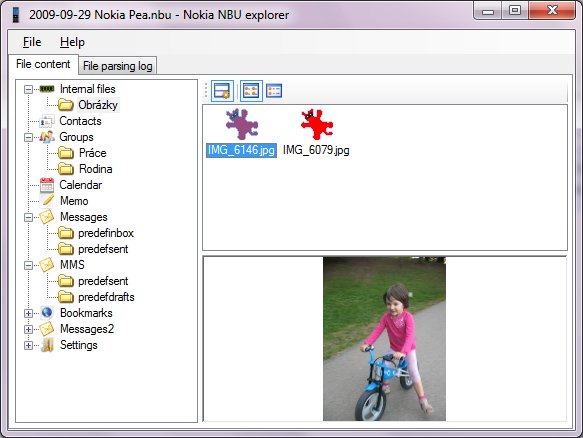
Nokia NbuExplorer

Download Nokia NbuExplorer [Homepage]